Objects
- Attribute / Field / State: basic characteristics that define the object
- Behaviors: activities of the object
Class variables (static fields)
certain states that belong to the class
- if you change a class variable anywhere, you change it everywhere, that is, for every object in the class
Instance variables (non-static fields)
certain states that belong to the object
- only an object may have a value for instance variables
- changing the value of one object does NOT affect other objects
Classes
the blueprint from which an object is created
- an object is also called an instance of the class
- classes define attributes and available behaviors of its objects
- members:
- instance variables: attributes of objects
- constructors: procedures for constructing a new object of the class and initializing its fields
- methods: behaviors
- e.g.
   public class Student{
	   //instance variables
	   private String name;
	   private double gpa;

	   //constructor
	   public Student(String newName, double newGpa){
		   name = newName;
		   gpa = newGpa;
	   }

	   //methods
	   public String getName(){
		   return name;
	   }

	   public void setGpa(double newGpa){
		   gpa = newGpa;
	   }
   }
Constructors
- The name of the constructor is always the same as the name of the class
- Constructors have no return type (not even void)
Methods
- Methods that don’t need an object, that can be called from the class are called static methods (can access only class variables)
- Methods that can only be accessed from an object are called non-static methods (can access class variables or instance variables)
Creating an object
-
use the keyword “new”: e.g. in a Lightbulb class, creating an object looks like this (assuming the constructor has no parameters):
Lightbulb x = new Lightbulb(); -
Different ways of creating an object have different effects, below is an example using String objects
String y = "Hello";identical string objects created this way points to the same location in memoryString z = new String ("Hello");identical string objects created this way create new strings each time in memory
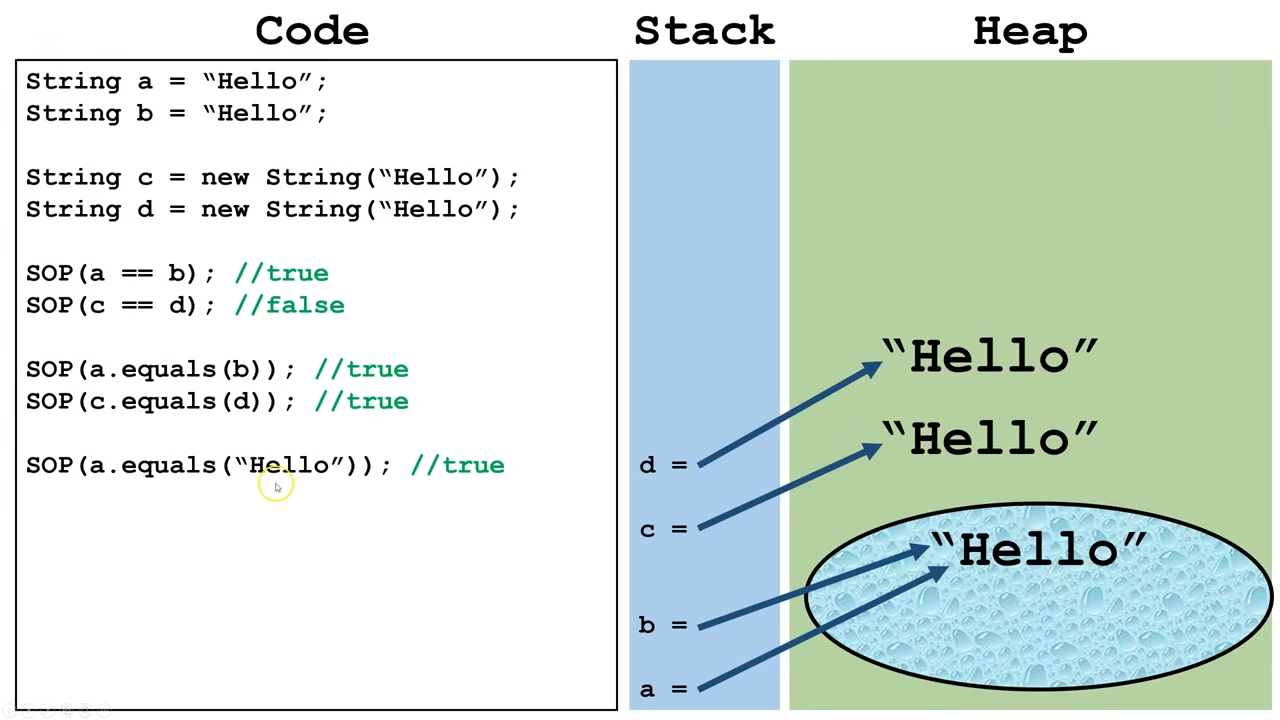
- In sum, use == to compare primitive data types. Some objects can be accurately compared using the .equals() method.